Book an Appointment
Call Seminole Computer Repair Service at 813-400-2865
                   

(813) 400-2865

*


Seminole Computer Repair Service has provided the best mobile computer repair in Seminole, FL and the greater Tampa Bay Area since 1999. The term "mobile computer repair" means we come to you to resolve all your computer problems.

We repair laptops, desktops, PCs and Apple computers. One of our highly qualified staff will come to you, often the same day, to take care of all your repair needs.

Why not use the #1 rated company for computer repair in Seminole, FL?

Computer Repair 4.9 / 5 stars from 306 reviews
Why use a computer tech when you can have a Seminole based Computer Engineer? Mon-Sun 8:00am - 8:00pm

Call us at (813) 400-2865

Text us at (813) 400-2865

Email us your questions

Book an Appointment

"Jason did an awesome job at explaining all the questions that we had! He will be our go to computer guru from now on! We highly recommend him!!"
Seminole Computer Repair Service 5 / 5 stars
"Ben was very professional, answered questions, offered advise pleasantly. I appreciated his assistance in securing my computer."
Seminole Computer Repair Service 5 / 5 stars
"Great service - from the initial phone call and scheduling - very upfront on costs - and ease of biz. Showed up on time, with a 15 min courtesy call -- he was professional, knowledgeable and gave great advice. He replaced my hard drive and got me back up and running. I would recommend this service. I chose it b/c of all the positive online reviews - and I was not disappointed. Nice job!"
Seminole Computer Repair Service 5 / 5 stars
"Great service today! Fixed all of my issues and was very helpful in making suggestions on products to fit my needs. Arrived on time and was pleasant and professional. I will call again!"
Seminole Computer Repair Service 5 / 5 stars
"Excellent service, same day, actually same hour. 30 minutes and we were back working. A+"
Seminole Computer Repair Service 5 / 5 stars

Who is Seminole Computer Repair Service?

Seminole Computer Repair Service is owned by Matt Karls, an Electrical Engineer and a Computer Systems Engineer. We are a team of computer professionals focused on Service and quality, all our work is guaranteed.

If you have any computer, technology or IT problem in Seminole, FL we can fix it. We have been performing computer repair in Seminole full time since 1999. Feel free to give us a call or text us at (813) 400-2865.

Seminole Computer Repair Service's Computer Engineer

What is your Service Area for on-site Computer Repair?

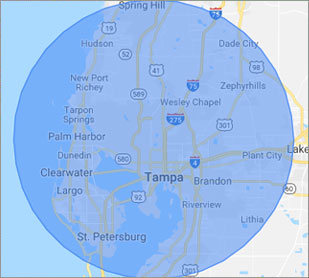
Our primary on-site mobile service areas include the greater Tampa Bay Area and the Phoenix, Tucson, Las Vegas, San Diego, Salt Lake City, Denver, Dallas-Fort Worth and Orlando metro areas.

We provide remote and mobile computer repair in Seminole, Apollo Beach, Bayonet Point, Brandon, Carrollwood, Cheval, Citrus Park, Clearwater, Dunedin, East Lake, East Lake-Orient Park, Egypt Lake-Leto, Elfers, Gibsonton, Gulfport, Holiday, Hudson, Jasmine Estates, Keystone, Lake Magdalene, Land O' Lakes, Largo, Lutz, Mango, New Port Richey, Northdale, Oldsmar, Palm Harbor, Palm River-Clair Mel, Pinellas Park, Plant City, Riverview, Ruskin, Safety Harbor, Shady Hills, Spring Hill, St. Pete Beach, St. Petersburg, Sun City Center, Tampa, Tarpon Springs, Temple Terrace, Thonotosassa, Town 'n' Country, Trinity, University, Valrico, Wesley Chapel, Westchase and Zephyrhills.

Our on-site Computer Service Area

What should someone expect that hires you for Computer Service?

Our mission is to fully resolve your computer problems quickly and affordably. If you want a Computer Engineer that can fix all of your computer problems instead of a computer tech, a computer geek, a technician or a computer guy that can only fix some of your problems; call us at (813) 400-2865.  

What types of Computer Services do you perform?

We service businesses and business clients in their homes, including:
 
  • Diagnose / repair hardware or software problems
  • Spyware, malware, trojan and virus removal
  • Setup wireless and small business networks
  • Laptop repair, PC repair and Apple repair
  • Hard drive data recovery

Seminole Computer Repair Service Contact Information

Seminole Computer Repair Service
(813) 400-2865

Seminole Computer Repair Service is a Karls Technology company

* *
*
*
*
  *
* *


*
*
* * * * * * * * * * * * * * *
4.9 / 5 stars from 306 reviews

"My whole experience was great. Ken was personal as well as professional. He was quick and efficient. I would highly recommend."

Seminole Computer Repair Service 5 / 5 stars

"Awesome and very fun to talk with!"

Seminole Computer Repair Service 5 / 5 stars

"Jason was the epitome of professionalism. He was so knowledgeable as well as thorough. I would use him anytime. I am extremely happy and thank you very much."

Seminole Computer Repair Service 5 / 5 stars

"The service was prompt and professional and the price was right! Thank you very much!"

Ahwatukee Computer Repair Service 5 / 5 stars
Best Antivirus Software of 2026: The Ultimate Guide to Cybersecurity Brands

In 2026, the digital threat landscape has shifted. We are no longer just fighting simple viruses; we are defending against AI-generated phishing, sophisticated ransomware-as-a-service, and complex identity theft. Choosing the right antivirus brand is no longer optional—it is the foundation of your digital life. At Karls Technology, we’ve analyzed the top-performing security suites of the […] The post Best Antivirus Software of 2026: The Ultimate Guide to Cybersecurity Brands appeared first on Computer Repair Blog.

Apple Event in October

Apple is reportedly getting set to have an event in October. This time around, Apple is putting its attention squarely on its newest hardware and software releases: iPadOS 16 and macOS Ventura. 9to5Mac reports that Apple is working on including the MagSafe connector into the iPad Pro 11 (with an LCD panel) and the iPad […] The post Apple Event in October appeared first on Computer Repair Blog.

Removing Icons on Desktop

One of the quickest and easiest methods to free up space and boost Windows 10’s performance is to get rid of the icons cluttering your desktop. In Windows 10, you can quickly and easily clear your desktop of icons with only a few clicks. It’s as simple as right-clicking an icon on the Windows 10 […] The post Removing Icons on Desktop appeared first on Computer Repair Blog.

Closing Windows with Shortcut

Pressing the Windows key + D instantly minimizes all open windows. By doing it this manner, you can avoid manually closing each window. To restore any minimized windows to their original position, hit the Win and D keys simultaneously. The desktop can be accessed by hitting the Windows key and the letter M. Apps like […] The post Closing Windows with Shortcut appeared first on Computer Repair Blog.

How to Delete Cookies

In your browser settings, you will find the clear browser data. With Google Chrome, click on the three dots on the top right corner of the browser. From there, scroll to More tools and a second list will show up. Click the Clear browser data option. Afterwards, a pop-up occurs, like the one below: You can now clear whatever history, […] The post How to Delete Cookies appeared first on Computer Repair Blog.

Guide to Antivirus Brands in 2024

Karls Technology’s Comprehensive Guide to the Best Antivirus Brands in 2024 In today’s digital age, cybersecurity is more critical than ever. With the increasing number of cyber threats, from malware and phishing attacks to ransomware and identity theft, having reliable antivirus software is a necessity. The market is saturated with numerous antivirus brands, each offering […] The post Guide to Antivirus Brands in 2024 appeared first on Computer Repair Blog.

Upcoming VPN Feature on Windows 11

As of Windows 11, a message may soon appear in the system tray when you are connected to a VPN, allowing you to confirm that you are connected if you prefer anonymous browsing. Virtual Private Networks (VPNs) make it possible to surf the Internet without being traced. Unfortunately for companies, this location-insensitive technology is useless […] The post Upcoming VPN Feature on Windows 11 appeared first on Computer Repair Blog.

Stop Applications From Starting Automatically

After being installed, certain programs will operate in the background on occasion. Even while it works for a few apps, its overall performance is poor. System performance drops when a large number of apps are set to launch automatically. For optimal speed, unnecessary programs during startup should be disabled. The good news is that Windows […] The post Stop Applications From Starting Automatically appeared first on Computer Repair Blog.

Remote Tech Support Can Be Risky

Using remote tech support is a high risk situation. Scammers posing as remote tech help can install malware on victims’ computers. Malware can remotely access a device, allowing hackers to inspect its data and take control. If you encounter infected pop-ups, don’t call any of the known software tech companies. Scammers will demand urgent payment […] The post Remote Tech Support Can Be Risky appeared first on Computer Repair Blog.

New Microsoft Defender SmartScreen Feature

In an effort to ward off phishing attacks and encourage users to use strong passwords, Microsoft released Defender SmartScreen. The Windows 11 22H2 update, which Microsoft issued at the end of the previous month, included a new feature that should make it easier for users to keep their credentials secure. When logging into an app […] The post New Microsoft Defender SmartScreen Feature appeared first on Computer Repair Blog.